


 5 min read
Moving to the cloud is a big step for any organization. It’s not just about lifting and shifting servers; it's about rethinking how your infrastructure, applications, and data work together in a flexible, scalable environment.
AWS offers a suite of migration tools designed to make this process smoother and more predictable. They help organizations plan, execute, and track migrations with confidence, starting from discovering what you have on-premises, to moving servers and databases, to transferring large volumes of data.
In this article, we’ll guide you through the key AWS migration tools, explain how they work, and show how they support a successful transition to the cloud.
DISCOVERY: UNDERSTANDING YOUR CURRENT ENVIRONMENT
Before moving any workloads, it’s critical to understand what exists on-premises. AWS Migration Hub provides a single dashboard to track migration progress, resources, and planning activities. All other AWS migration services report data into this hub, giving teams a centralized view of the project.
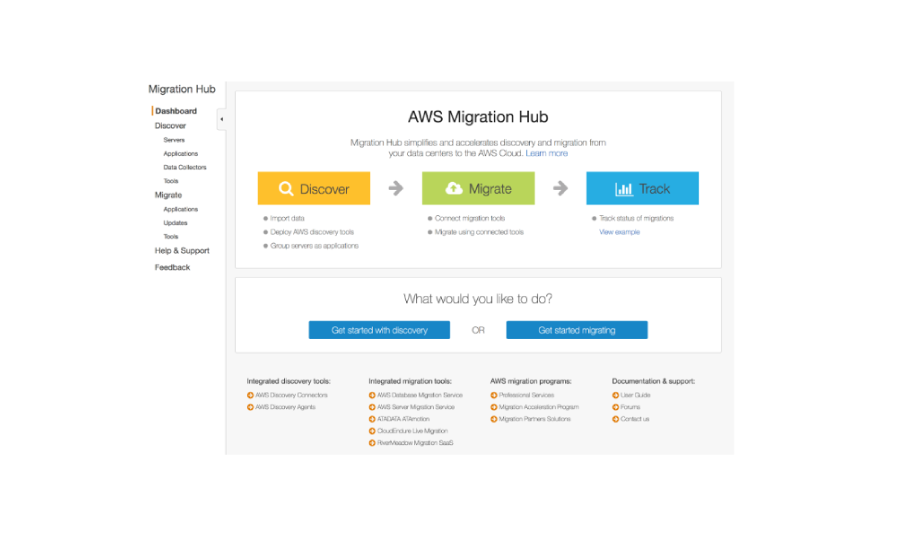
Complementing this, AWS Application Discovery Service (ADS) collects detailed information about servers, applications, and dependencies. ADS captures server utilization and dependency mapping, which can be exported to CSV, queried in Amazon Athena, or imported into Migration Hub. This insight helps organizations accurately plan which workloads to migrate, reducing surprises and downtime.
SERVER MIGRATION: MOVING YOUR APPLICATION
Once the environment is understood, AWS provides two key options for migrating servers:
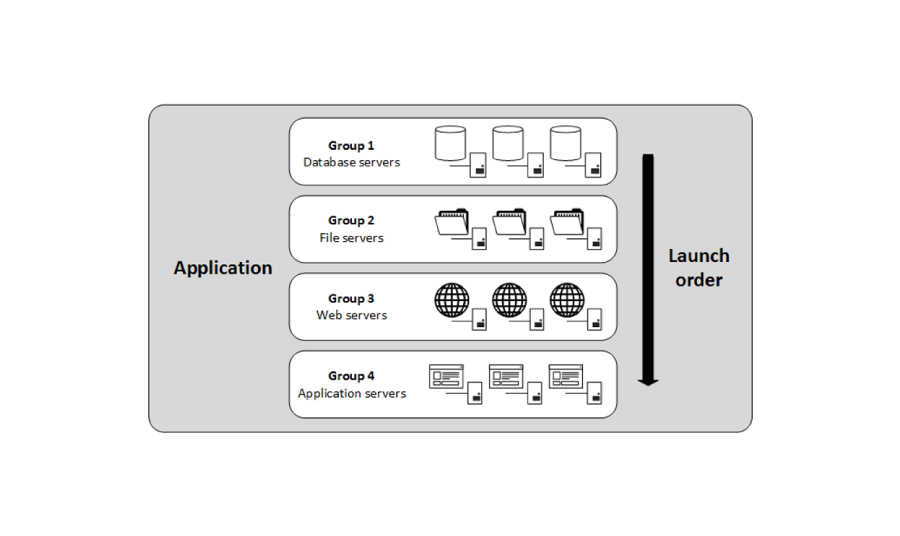
AWS Server Migration Service (SMS) is an agentless solution that automates and schedules server migration tasks. It works with VMware ESXi and Microsoft Hyper-V servers, allowing migration of individual servers or groups of instances. SMS supports layered migrations, meaning application, presentation, and database layers can be migrated step by step. After migration, SMS can generate CloudFormation templates to deploy applications in AWS. It also supports scheduled updates, keeping cloud-ready images current for disaster recovery purposes.
AWS CloudEndure Migration operates at the disk level, replicating source servers block by block to AWS. CloudEndure continues to monitor and sync changes until the cutover, making it ideal for migrating databases like Microsoft SQL or Oracle and enterprise applications such as SAP. Beyond migration, CloudEndure also enables disaster recovery in other regions, meeting required RTO and RPO objectives.
DATABASE MIGRATION: MOVING DATA SAFELY AND EFFICIENTLY
Migrating databases requires careful handling of schemas, relationships, and workloads. AWS Database Migration Service (DMS) supports migrating databases between different engines, including moving workloads to cloud-native services like Amazon Aurora. DMS allows flexible rule sets for schema conversion, real-time changes, and migration of features from source to target.
For more complex migrations, Schema Conversion Tool (SCT) helps convert database schemas between engines, ensuring applications continue to function correctly after migration. SoftServe has successfully used DMS and SCT to migrate on-premises databases to AWS Aurora and Redshift, delivering projects on time and on budget.
DATA TRANSFER: MOVING LARGE OR ONGOING DATA
Large-scale or persistent data migration requires dedicated solutions:
Offline Migration – AWS Snow Family provides physical devices for high-volume transfers:
- Snowcone: move up to 8 TB of data to the cloud
- Snowball: move 50–80 TB of data to the cloud
- Snowball Edge: move 100 TB of data to the cloud
- Snowmobile: exabyte-scale, delivered in a 45ft container
Online Migration – AWS offers hybrid or cloud-connected options:
- AWS Storage Gateway is a hybrid storage service that provides low-latency access to AWS from on-premises environments. It integrates seamlessly with S3, Glacier, and Amazon EBS, allowing your on-premises applications to use cloud storage as if it were local. Storage Gateway supports standard storage protocols such as NFS, SMB, and iSCSI, making it compatible with a wide range of workloads. It also includes a caching feature that keeps frequently accessed data locally, improving performance while still maintaining the benefits of cloud storage.
- AWS DataSync automates the transfer of data between on-premises storage and the AWS cloud. It integrates seamlessly with services such as AWS FSx, EFS, and S3, making it suitable for a wide range of workloads and file systems. DataSync supports both one-time migrations and continuous, incremental transfers, allowing you to keep on-premises and cloud data synchronized in near real-time.
CONCLUSION
AWS provides a comprehensive toolkit to make cloud migration structured, predictable, and efficient. From discovery and assessment to server and database migration and data transfer, these services reduce risk, maintain continuity, and empower organizations to take full advantage of the cloud.
As an AWS Premier Tier Partner, SoftServe brings global expertise to migration projects. We help you assess where they are, plan the journey, and execute migrations that improve performance, efficiency, and total cost of ownership.
If you’re considering moving to AWS, we can help you navigate the process, select the right tools, and ensure a smooth transition for your infrastructure and data.
Start a conversation with us